<?xml version="1.0" encoding="utf-8"?><feed xmlns="http://www.w3.org/2005/Atom" xml:lang="ko_KR"><generator uri="https://jekyllrb.com/" version="3.10.0">Jekyll</generator><link href="https://jungtaejoon.github.io/blog/feed/en.xml" rel="self" type="application/atom+xml" /><link href="https://jungtaejoon.github.io/blog/" rel="alternate" type="text/html" hreflang="ko_KR" /><updated>2026-11-12T09:55:37+09:00</updated><id>https://jungtaejoon.github.io/blog/feed/en.xml</id><title type="html">Slop Log | En</title><subtitle>AI가 만든 것들 속에서 보석을 캐는 커뮤니티 Slop을 만들며 남기는 기록. 곁가지로 만든 도구 이야기도 함께 써요.</subtitle><author><name>jungtaejoon</name></author><entry xml:lang="en"><title type="html">claude-warmup 0.3: make Claude’s 5-hour limit reset right at your busiest time</title><link href="https://jungtaejoon.github.io/blog/en/2026/11/12/claude-warmup-peak-time/" rel="alternate" type="text/html" title="claude-warmup 0.3: make Claude’s 5-hour limit reset right at your busiest time" /><published>2026-11-12T00:00:00+09:00</published><updated>2026-11-12T00:00:00+09:00</updated><id>https://jungtaejoon.github.io/blog/en/2026/11/12/claude-warmup-peak-time</id><content type="html" xml:base="https://jungtaejoon.github.io/blog/en/2026/11/12/claude-warmup-peak-time/"><![CDATA[<p><a href="https://jungtaejoon.github.io/claude-warmup/">claude-warmup</a> is a small tool that keeps a Claude Pro/Max 5-hour window always running. It opens a new window as soon as the last one ends, so whenever you sit down, your first message doesn’t start a full 5-hour wait.</p>

<p>Using it, I noticed one thing missing. I get up at about the same time every day, and my busiest hours are about the same too. So the best thing would be a reset <strong>right at that time</strong>. Version 0.2 added a peak time, and 0.3 lets you choose the empty hours yourself.</p>

<h2 id="what-a-peak-time-is">What a peak time is</h2>

<p>Tell it “weekdays at 11:30 are my busiest,” and it works backward. For a reset at 11:30, that window has to start at 06:30, the one before at 01:30, and so on.</p>

<h2 id="a-day-leaves-4-hours-over">A day leaves 4 hours over</h2>

<p>There’s a catch. A day is 24 hours and a window is 5, so four windows back to back fill 20 hours and <strong>4 hours have no window.</strong> As long as windows line up with the peak, those 4 empty hours have to go somewhere.</p>

<p>In 0.2 they landed right after the peak (11:30–15:30), right after the busiest time, which is the worst place. So from 0.3 <strong>you choose where they go.</strong> Setting a peak lists the five choices and asks for a number.</p>

<div class="language-plaintext highlighter-rouge"><div class="highlight"><pre class="highlight"><code>$ claude-warmup config peak 11:30 weekdays
✓ peak = 11:30 weekdays
  A day is 24 hours, so lining windows up with weekdays 11:30 leaves 4 hours with no window. Where should they go?
    1) 11:30–15:30  (right after the peak)
    2) 16:30–20:30
    3) 21:30–01:30
    4) 02:30–06:30
    5) 07:30–11:30  (right before the peak)
  Number (Enter to decide later): 4
✓ Empty hours (no window): 02:30–06:30
  Pings now line up at 06:30, 11:30, 16:30, 21:30, so a window resets right at weekdays 11:30.
</code></pre></div></div>

<p>I left the early morning empty, while I’m asleep. On weekdays windows now run 06:30 → 11:30 (reset) → 16:30 → 21:30 → 02:30, and only 02:30–06:30 is empty.</p>

<table>
  <thead>
    <tr>
      <th>Command</th>
      <th>Meaning</th>
    </tr>
  </thead>
  <tbody>
    <tr>
      <td><code class="language-plaintext highlighter-rouge">config peak 11:30 weekdays</code></td>
      <td>Weekdays at 11:30 (<code class="language-plaintext highlighter-rouge">mon-fri</code>, <code class="language-plaintext highlighter-rouge">mon,wed,fri</code> work too; no days means every day)</td>
    </tr>
    <tr>
      <td><code class="language-plaintext highlighter-rouge">config gap</code></td>
      <td>Shows the empty-hour choices again and asks</td>
    </tr>
    <tr>
      <td><code class="language-plaintext highlighter-rouge">config gap 4</code></td>
      <td>Picks choice 4 (or a time inside it: <code class="language-plaintext highlighter-rouge">config gap 03:00</code>)</td>
    </tr>
    <tr>
      <td><code class="language-plaintext highlighter-rouge">config peak off</code></td>
      <td>Off (windows chain back to back as before)</td>
    </tr>
  </tbody>
</table>

<h2 id="how-it-behaves">How it behaves</h2>

<ul>
  <li><strong>The peak applies only once you’ve chosen the empty hours.</strong> It won’t pick them for you.</li>
  <li><strong>Off an aligned time, it waits.</strong> A window opened at the wrong moment would throw the peak off. While it waits it doesn’t call Claude at all, so it costs no tokens.</li>
  <li><strong>A window that’s already off can’t be fixed.</strong> If your own message opened a window at another time, it can’t be moved. When it ends, claude-warmup lines up again at the next aligned time.</li>
  <li><strong>With days set, the time in between works as before.</strong> Aligning starts within a day of each peak. When the next peak is far away, like over a weekend, a new window starts as soon as the last one ends.</li>
  <li><strong>Change the peak</strong> and the choices change too. If the empty hours you chose no longer fit, it asks again.</li>
</ul>

<p>You can see it all in the status screen:</p>

<div class="language-plaintext highlighter-rouge"><div class="highlight"><pre class="highlight"><code>Auto warm-up
  Schedule    06:00–23:00 · every day
  Peak time   weekdays 11:30 · pings lined up at 06:30, 11:30, 16:30, 21:30
  Gap         02:30–06:30
  Next ping   ~16:25, lined up so a window resets at tomorrow 11:30
</code></pre></div></div>

<h2 id="how-to-update">How to update</h2>

<div class="language-bash highlighter-rouge"><div class="highlight"><pre class="highlight"><code>npm <span class="nb">install</span> <span class="nt">-g</span> github:jungtaejoon/claude-warmup
claude-warmup <span class="nb">install
</span>claude-warmup config peak 11:30 weekdays
</code></pre></div></div>

<p>Run <code class="language-plaintext highlighter-rouge">install</code> again so the background service switches to the new version. If you already use a peak time, choose the empty hours with <code class="language-plaintext highlighter-rouge">claude-warmup config gap</code>. If you set it up on a server with <code class="language-plaintext highlighter-rouge">scripts/server-setup.sh</code>, add <code class="language-plaintext highlighter-rouge">--prefix ~/.local</code> to the npm command so it replaces the same copy. I forgot that at first, and my server kept running the old version.</p>

<p>What changed: <a href="https://github.com/jungtaejoon/claude-warmup/releases/tag/v0.3.0">0.3 release notes</a> · <a href="https://github.com/jungtaejoon/claude-warmup/releases/tag/v0.2.0">0.2 release notes</a></p>]]></content><author><name>jungtaejoon</name></author><category term="en" /><summary type="html"><![CDATA[Set a peak time and claude-warmup works backward so a 5-hour window resets right then. A day doesn't divide into 5-hour windows, so you choose where the 4 empty hours go.]]></summary><media:thumbnail xmlns:media="http://search.yahoo.com/mrss/" url="https://jungtaejoon.github.io/claude-warmup/og.png" /><media:content medium="image" url="https://jungtaejoon.github.io/claude-warmup/og.png" xmlns:media="http://search.yahoo.com/mrss/" /></entry><entry xml:lang="en"><title type="html">A dungeon survivors game inside WoW: Dungeon Rush</title><link href="https://jungtaejoon.github.io/blog/en/2026/11/12/introducing-dungeon-rush/" rel="alternate" type="text/html" title="A dungeon survivors game inside WoW: Dungeon Rush" /><published>2026-11-12T00:00:00+09:00</published><updated>2026-11-12T00:00:00+09:00</updated><id>https://jungtaejoon.github.io/blog/en/2026/11/12/introducing-dungeon-rush</id><content type="html" xml:base="https://jungtaejoon.github.io/blog/en/2026/11/12/introducing-dungeon-rush/"><![CDATA[<p>Waiting on auction prices or a group, I kept wishing for something quick to play without leaving the game. So I made <strong><a href="https://www.curseforge.com/wow/addons/dungeon-rush">Dungeon Rush</a></strong>, a minigame addon that runs inside WoW Forever. Like <a href="/blog/en/2026/11/11/introducing-forgeflow/">ForgeFlow</a>, I built it with Claude Code and tuned it by playing it in game. It is under review on CurseForge right now.</p>

<h2 id="how-it-plays">How it plays</h2>

<p>Open it with <code class="language-plaintext highlighter-rouge">/dungeonrush</code> or <code class="language-plaintext highlighter-rouge">/drush</code>. Pick a class and a dungeon and move with WASD; your skills fire on their own. Space or Shift dashes, and every level up offers three cards to choose from.</p>

<ul>
  <li><strong>Classes and talents.</strong> Nine classes with three specs each. Every skill is a real class ability turned into an automatic attack, with its name and icon from the game. Each level gives a talent point; deeper tiers open as you spend, and the end of a tree completes the spec’s signature skill.</li>
  <li><strong>Dungeons and bosses.</strong> 35 dungeons in level order, starting with Ragefire Chasm, each with its real bosses in kill order. Between bosses you choose a road of trash, elite, campfire, merchant and event rooms.</li>
  <li><strong>Not just for ranged.</strong> Every boss has a move that punishes standing far away, and every dungeon has monsters that close the gap fast. Melee and ranged both have to keep moving.</li>
  <li><strong>Levelling never makes you safe.</strong> Monsters get tougher and more numerous with every room and every level. Choose Story, Normal, Heroic, Mythic, or Mythic+ keystones from +2 to +20 with Fortified, Tyrannical, Raging, Volcanic and Bolstering.</li>
  <li><strong>WoW’s own sounds.</strong> Footsteps, hits, level-ups, buttons and dashes use sounds from the game client.</li>
</ul>

<h2 id="what-lasts">What lasts</h2>

<p>Emblems from every run buy permanent upgrades, classes gain mastery, clears open the next dungeons, and a run in progress continues after a /reload.</p>

<p>Turn on <strong>game progress backup</strong> in the ForgeFlow Windows Companion 0.12.0 and your progress is kept on your account, so it comes back on a new PC or after a reinstall. It is off by default.</p>

<h2 id="safe-to-play">Safe to play</h2>

<p>Entering combat pauses the game at once, closes the window and gives your keyboard back. It makes no protected calls and no network traffic.</p>

<h2 id="judge-it-on-slop">Judge it on Slop</h2>

<p><a href="https://slop.ai.kr/#/p/4a8a9e29-2f4d-43ef-8015-f11a58729af7">Dungeon Rush is on Slop too</a>, with more in-game screenshots. Try it and vote <strong>▲ gem</strong> or <strong>▼ slop</strong>. Comments about hard bosses, slow stretches or class balance go straight into the next version.</p>]]></content><author><name>jungtaejoon</name></author><category term="en" /><summary type="html"><![CDATA[Dungeon Rush is a survivors-style minigame addon for WoW Forever. Pick one of nine classes and fight through the dungeons, boss by boss.]]></summary><media:thumbnail xmlns:media="http://search.yahoo.com/mrss/" url="https://jungtaejoon.github.io/blog/assets/img/dungeonrush/logo.png" /><media:content medium="image" url="https://jungtaejoon.github.io/blog/assets/img/dungeonrush/logo.png" xmlns:media="http://search.yahoo.com/mrss/" /></entry><entry xml:lang="en"><title type="html">Is it worth crafting? ForgeFlow, a crafting and auction addon for WoW Forever</title><link href="https://jungtaejoon.github.io/blog/en/2026/11/11/introducing-forgeflow/" rel="alternate" type="text/html" title="Is it worth crafting? ForgeFlow, a crafting and auction addon for WoW Forever" /><published>2026-11-11T00:00:00+09:00</published><updated>2026-11-11T00:00:00+09:00</updated><id>https://jungtaejoon.github.io/blog/en/2026/11/11/introducing-forgeflow</id><content type="html" xml:base="https://jungtaejoon.github.io/blog/en/2026/11/11/introducing-forgeflow/"><![CDATA[<p>Leveling professions in WoW Forever always comes with the same questions. Will this make a profit? Is it cheaper to buy the materials, or to craft the intermediate ones myself? Between the calculator and trips back and forth to the auction house, there isn’t much time left to play. So I’m building <strong><a href="https://www.curseforge.com/wow/addons/forgeflow">ForgeFlow</a></strong>, an addon that turns that whole process into one flow. Like <a href="https://slop.ai.kr/">Slop</a>, I build it together with AI tools such as Claude Code and refine it by playing with it in game. The screenshots below are from the Korean client; the addon also runs in English.</p>

<h2 id="workshop-check-the-profit-before-you-craft">Workshop: check the profit before you craft</h2>

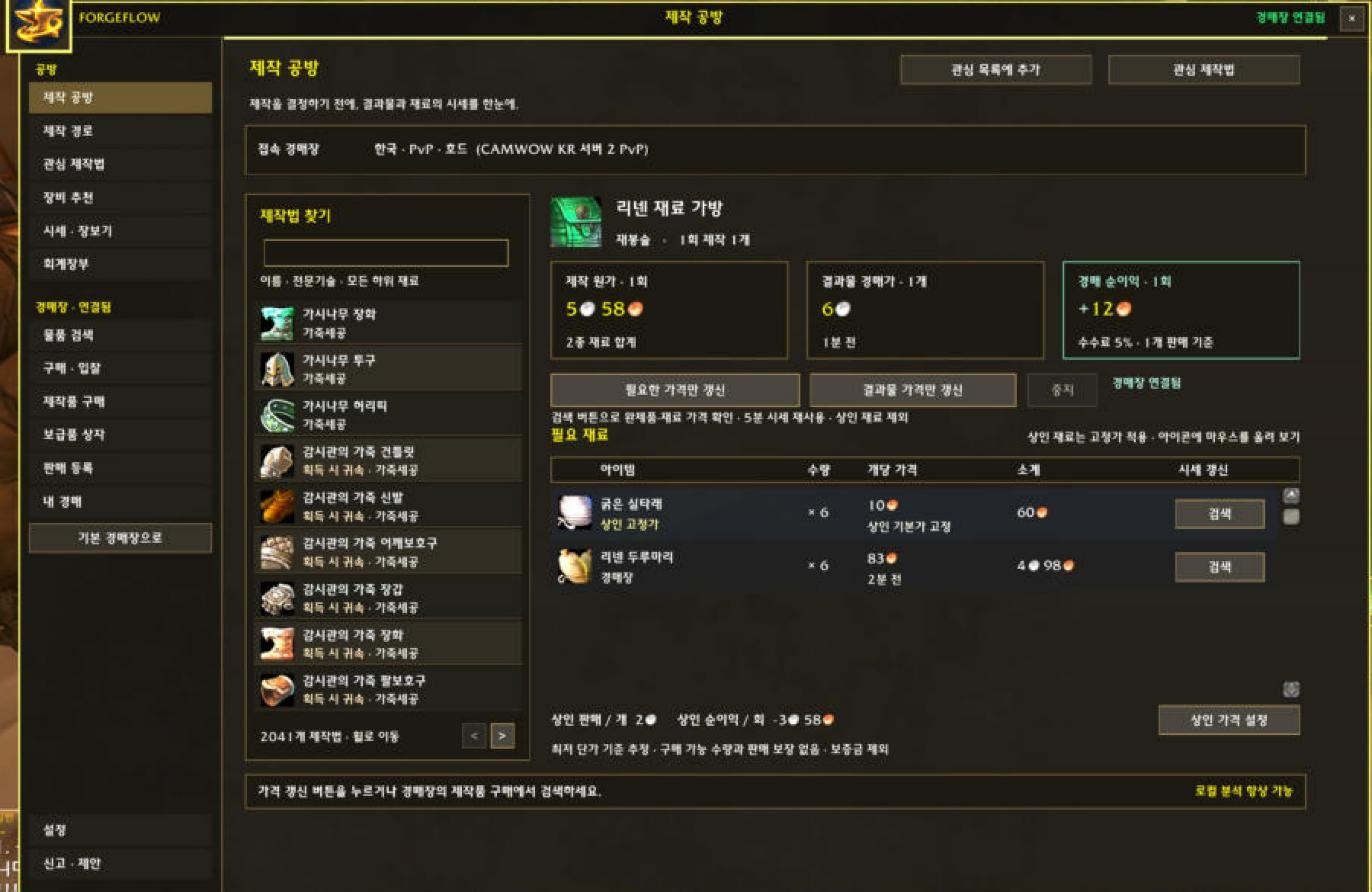
<p><img src="/blog/assets/img/forgeflow/workshop.jpg" alt="The ForgeFlow workshop. For a Linen Reagent Bag it shows crafting cost, auction price of the result, net profit after the fee, and the price of each material." /></p>

<p>Pick a recipe and you see <strong>crafting cost, the auction price of the result, and net profit after the auction fee</strong> at a glance. Each material shows whether it’s a fixed vendor price or an auction price, and when that price was checked. Prices are looked up only for the items you need and reused for 5 minutes. ForgeFlow never scans the whole auction house.</p>

<h2 id="crafting-route-buy-or-craft">Crafting route: buy or craft?</h2>

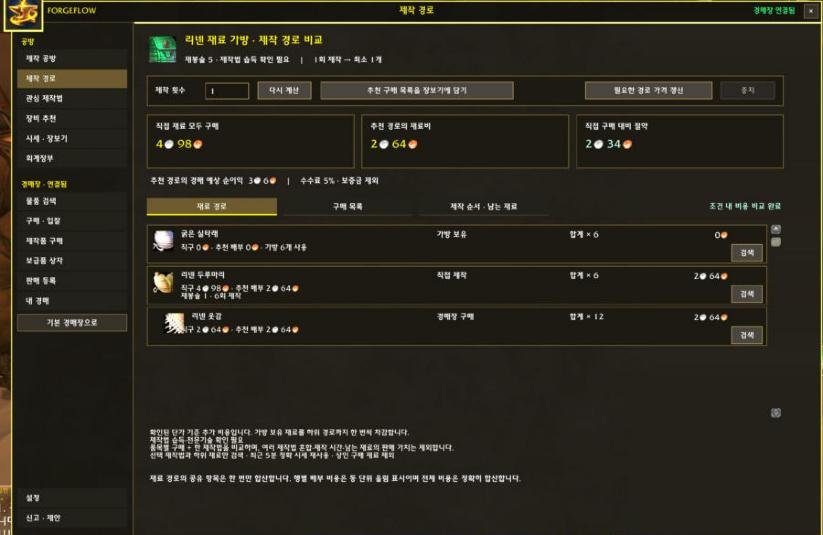
<p><img src="/blog/assets/img/forgeflow/route.jpg" alt="The ForgeFlow crafting route. It compares buying all direct materials with the recommended route and shows how much crafting the intermediates saves." /></p>

<p>Expand the material tree to <strong>compare “buy everything” with “craft the intermediates yourself.”</strong> Materials already in your bags are deducted, and repeated materials are combined. In the screenshot you can see right away that making Bolts of Linen Cloth from cloth instead of buying them saves over 2 silver. The missing materials for the recommended route go into your shopping list with one button.</p>

<h2 id="auction-house-only-what-you-need-on-your-click">Auction house: only what you need, on your click</h2>

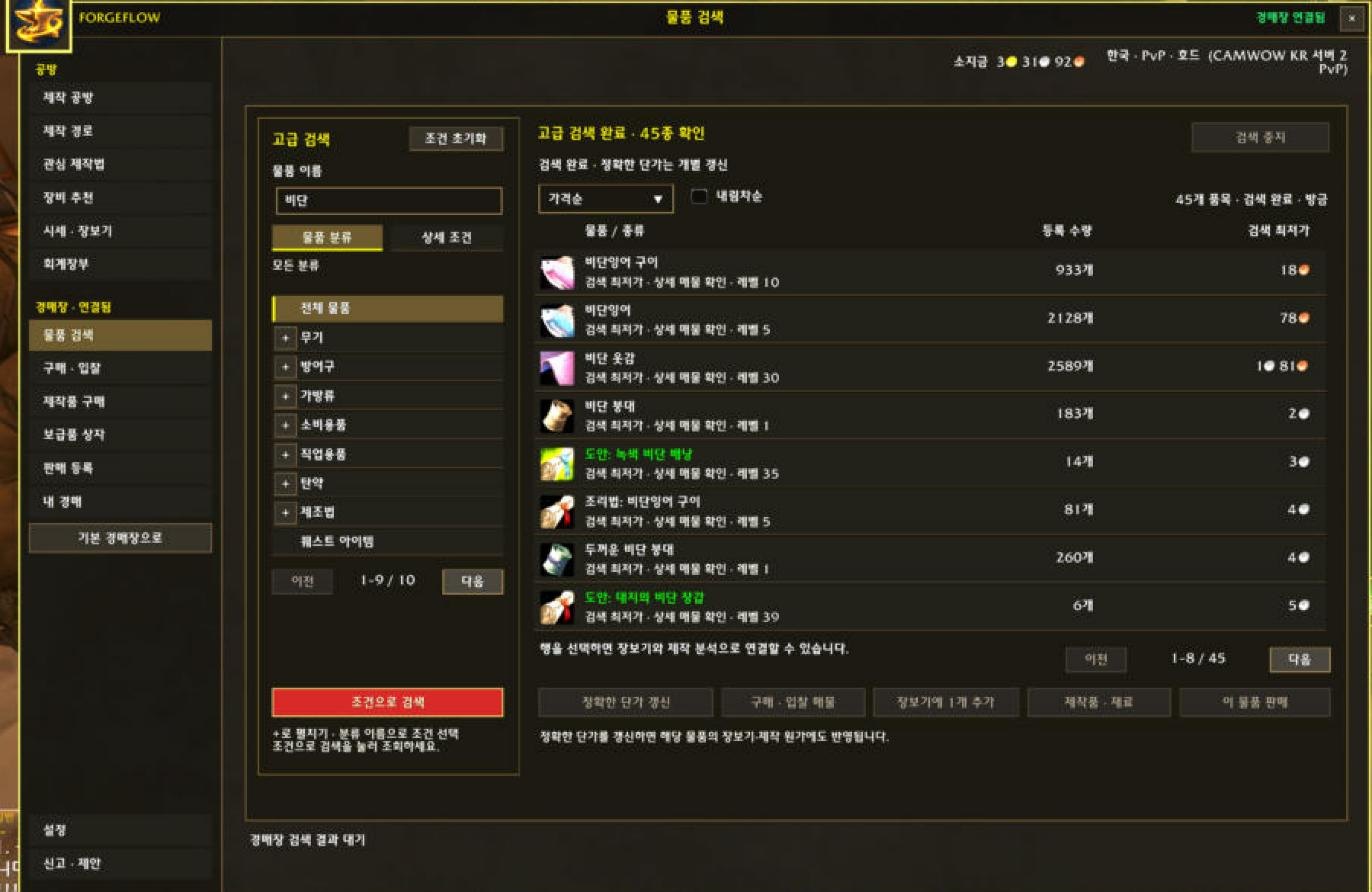
<p><img src="/blog/assets/img/forgeflow/auction-search.jpg" alt="The ForgeFlow item search. Categories and search options on the left; on the right, silk-related items with listed quantity and lowest price." /></p>

<p>The auction pages (search, buy and bid, buy crafted items, sell, my auctions) open only while you’re talking to an auctioneer. From search results you can add an item to your shopping list, jump to crafting analysis, or go to the sell screen. When selling, you set your price with competing listings right beside the form.</p>

<p>Trading is built to be safe: <strong>buying, selling and cancelling happen only when you press the final button yourself.</strong> The addon never buys or sells on its own.</p>

<p>The newest page handles <strong>Waylaid Supplies crates</strong>. For the crates in your bags it searches only the materials and quantities they accept, compares the total cost of each option, and marks the cheapest one. Press buy and the purchase screen opens with the missing quantity already filled in.</p>

<h2 id="inside-the-games-profession-window">Inside the game’s profession window</h2>

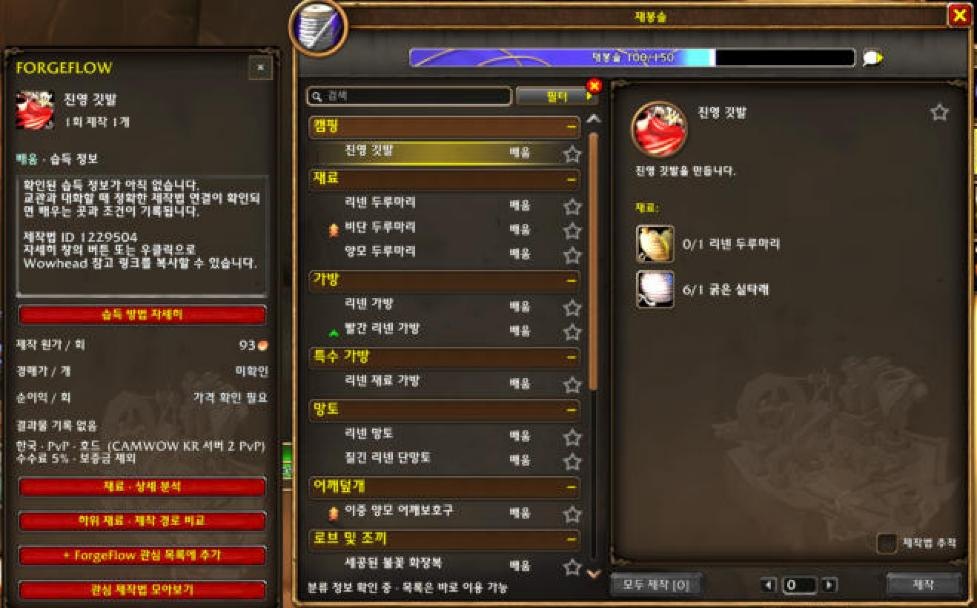
<p><img src="/blog/assets/img/forgeflow/profession-window.jpg" alt="The game's Tailoring window with the ForgeFlow panel attached on the left, showing how to learn the recipe and its cost. The recipe list shows learned and unlearned recipes and skill-up markers." /></p>

<p>A ForgeFlow panel sits next to the game’s profession window and shows the selected recipe’s cost and how to learn it. The list also includes <strong>recipes you haven’t learned yet</strong>, so you can plan what to learn next. Recipes with no item output, such as enchants, are listed with their materials too.</p>

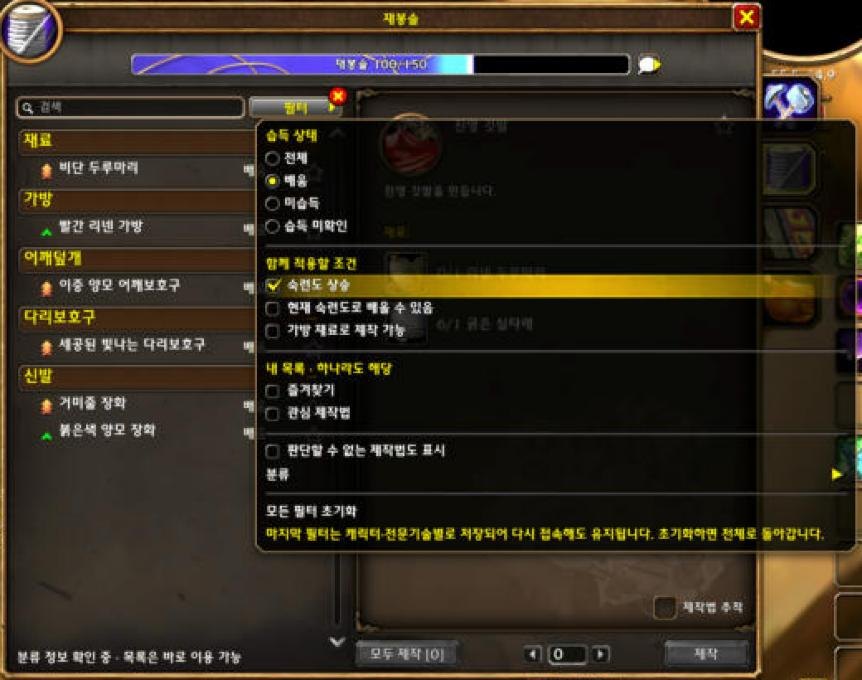
<p><img src="/blog/assets/img/forgeflow/profession-filter.jpg" alt="The ForgeFlow profession filter: learning state (all, learned, unlearned, unknown), conditions applied together (skill-up, learnable at current skill, craftable from bag materials), and my lists (favorites, interest recipes)." /></p>

<p>The filter changed a lot as I used it. You pick the learning state right at the top, and <strong>skill-up, learnable at your current skill, and craftable from bag materials</strong> all apply together (an intersection). Turn on “unlearned + skill-up + learnable now” and you’re left with exactly the recipes a trainer can teach you right now that will raise your skill. Favorites and interest recipes show a recipe if it’s in either list (a union). Your last filter is remembered per character and profession.</p>

<h2 id="recipe-data-is-checked-every-day">Recipe data is checked every day</h2>

<p>Every day the recipe list is compared with the newest Forever client build and the public profession lists. When something changed, the update is tested and prepared. Leftover recipes from an older season whose results can’t be confirmed are kept out.</p>

<h2 id="try-it">Try it</h2>

<ul>
  <li>It’s <strong>free</strong>. Get it on <a href="https://www.curseforge.com/wow/addons/forgeflow">CurseForge</a>. It runs on WoW Forever 1.60.1 in English and Korean.</li>
  <li>Open it in game with <code class="language-plaintext highlighter-rouge">/forgeflow</code> or the minimap button.</li>
  <li>If you like, the Windows Companion connects it to the <a href="https://forgeflow.co.kr/">ForgeFlow website</a> to back up your private ledger and browse the crafting catalog on the web. The addon works fully without it.</li>
</ul>

<p>The Waylaid Supplies page and the new filters in this post are in version 0.9.1, which is under review on CurseForge right now. If something bothers you or you want a feature, tell me in the CurseForge comments or on the <a href="https://forgeflow.co.kr/support">ForgeFlow support page</a>. Just like on Slop, I’ll take the feedback and grow it into the next version.</p>

<p>ForgeFlow is on Slop too: <a href="https://slop.ai.kr/#/p/3ef64616-47bf-4cba-93af-143a36fb5be1">the addon</a> and <a href="https://slop.ai.kr/#/p/9f9aae21-517d-4361-a374-2bed7d93740e">the Windows Companion</a>. Try them and judge whether they are gems or slop.</p>]]></content><author><name>jungtaejoon</name></author><category term="en" /><summary type="html"><![CDATA[ForgeFlow is a free WoW Forever addon that connects recipes, material routes, auction prices, selling and a private ledger in one flow. Like Slop, I'm building it with AI.]]></summary><media:thumbnail xmlns:media="http://search.yahoo.com/mrss/" url="https://jungtaejoon.github.io/blog/assets/img/forgeflow/workshop.jpg" /><media:content medium="image" url="https://jungtaejoon.github.io/blog/assets/img/forgeflow/workshop.jpg" xmlns:media="http://search.yahoo.com/mrss/" /></entry><entry xml:lang="en"><title type="html">How to stop waiting a full 5 hours for Claude’s usage limit to reset</title><link href="https://jungtaejoon.github.io/blog/en/2026/11/10/claude-5-hour-limit-reset/" rel="alternate" type="text/html" title="How to stop waiting a full 5 hours for Claude’s usage limit to reset" /><published>2026-11-10T00:00:00+09:00</published><updated>2026-11-10T00:00:00+09:00</updated><id>https://jungtaejoon.github.io/blog/en/2026/11/10/claude-5-hour-limit-reset</id><content type="html" xml:base="https://jungtaejoon.github.io/blog/en/2026/11/10/claude-5-hour-limit-reset/"><![CDATA[<p>While building <a href="https://slop.ai.kr/">Slop</a> with Claude Code, I saw the same thing almost every day. A productive morning, then around noon: “limit reached, resets at 2 PM.” My own first message at 9 had started a fresh 5-hour clock, so I waited two hours, right when I was most in the flow. So I looked into how the reset is timed and built a small tool.</p>

<h2 id="the-reset-is-5-hours-after-your-first-message">The reset is 5 hours after your first message</h2>

<p>Claude Pro and Max session limits run on windows that start with <strong>the first message</strong> after the last window ended, not on a fixed clock (<a href="https://support.claude.com/en/articles/11647753-how-do-usage-and-length-limits-work">help center</a>). Ask your first question at 9:00 and the limit resets at 14:00. The web app, desktop and mobile apps, and Claude Code share it. The weekly limit is separate.</p>

<p>You can see your own reset time by running <code class="language-plaintext highlighter-rouge">/usage</code> in Claude Code. It runs locally and uses no tokens.</p>

<h2 id="keep-a-window-running-and-you-wait-less">Keep a window running and you wait less</h2>

<p>The problem is that your first message starts the <strong>whole</strong> 5 hours. If a window was already running before you sat down, part of those 5 hours has already passed. Start a new window the moment the last one ends, and you get this:</p>

<table>
  <thead>
    <tr>
      <th>Window</th>
      <th>Start then, next reset at</th>
    </tr>
  </thead>
  <tbody>
    <tr>
      <td>6:00 to 11:00</td>
      <td>Start at 9:00 → 11:00 (otherwise 14:00)</td>
    </tr>
    <tr>
      <td>11:00 to 16:00</td>
      <td>Start at 13:00 → 16:00 (otherwise 18:00)</td>
    </tr>
    <tr>
      <td>16:00 to 21:00</td>
      <td>Start at 19:00 → 21:00 (otherwise midnight)</td>
    </tr>
  </tbody>
</table>

<p>Whenever you sit down, the next reset is about 2.5 hours away on average. You don’t get more usage. You just stop starting from a full 5-hour wait.</p>

<h2 id="automating-it-claude-warmup">Automating it: claude-warmup</h2>

<p>I can’t send a message every time a window ends, so I built <a href="https://jungtaejoon.github.io/claude-warmup/">claude-warmup</a>.</p>

<ul>
  <li>It checks every 5 minutes with <code class="language-plaintext highlighter-rouge">/usage</code> (0 tokens) and sends “hi” to haiku <strong>only when no window is open</strong>, so a new window follows right after the last one.</li>
  <li>It runs on your own computer or server and never reads your credentials, so no token has to live in another service.</li>
  <li>It shows session and weekly usage with reset times in the terminal.</li>
  <li>It runs on macOS, Linux and Windows, with a setup script for a free always-on server for when your laptop is off.</li>
</ul>

<div class="language-bash highlighter-rouge"><div class="highlight"><pre class="highlight"><code>npm <span class="nb">install</span> <span class="nt">-g</span> github:jungtaejoon/claude-warmup
claude-warmup <span class="nb">install
</span>claude-warmup config hours 06:00-23:00
</code></pre></div></div>

<p>I run it on a free Oracle Cloud server. Even with my Mac off, windows run back to back from 6 in the morning until night, so the clock is already running whenever I sit down.</p>

<p>The details are in the <a href="https://jungtaejoon.github.io/claude-warmup/claude-usage-limit-reset/">Claude usage limit reset guide</a>. The code is on <a href="https://github.com/jungtaejoon/claude-warmup">GitHub</a>.</p>]]></content><author><name>jungtaejoon</name></author><category term="en" /><summary type="html"><![CDATA[I got tired of waiting out nearly 5 hours every time I hit Claude's limit while building Slop, so I made claude-warmup, a small tool that keeps a 5-hour window always running.]]></summary><media:thumbnail xmlns:media="http://search.yahoo.com/mrss/" url="https://jungtaejoon.github.io/claude-warmup/og.png" /><media:content medium="image" url="https://jungtaejoon.github.io/claude-warmup/og.png" xmlns:media="http://search.yahoo.com/mrss/" /></entry><entry xml:lang="en"><title type="html">Is everything AI-made just slop? I built Slop, a community that finds the gems</title><link href="https://jungtaejoon.github.io/blog/en/2026/11/10/introducing-slop/" rel="alternate" type="text/html" title="Is everything AI-made just slop? I built Slop, a community that finds the gems" /><published>2026-11-10T00:00:00+09:00</published><updated>2026-11-10T00:00:00+09:00</updated><id>https://jungtaejoon.github.io/blog/en/2026/11/10/introducing-slop</id><content type="html" xml:base="https://jungtaejoon.github.io/blog/en/2026/11/10/introducing-slop/"><![CDATA[<p>Anyone can now write, draw, and even ship small web apps and games with AI. That also means a lot of it gets waved off with “it’s just AI-made.” People call that <strong>slop</strong>.</p>

<p>But mixed into the pile are things that are genuinely useful or fun. The problem is there is no good place to sort them out. So I built <strong><a href="https://slop.ai.kr/">Slop</a></strong>.</p>

<h2 id="how-slop-works">How Slop works</h2>

<ol>
  <li><strong>Post.</strong> Share AI-made writing, images, runnable HTML, code or links in topic communities. You can note which tools and prompts you used.</li>
  <li><strong>Try.</strong> Runnable HTML plays right in a sandbox, so you can try an AI-made web app or game without installing anything.</li>
  <li><strong>Judge.</strong> People who try it vote <strong>▲gem</strong> or <strong>▼slop</strong>. Comments carry a type such as “found value”, “suggestion” or “question”, so the reason behind each judgment stays visible.</li>
  <li><strong>Grow.</strong> The author posts a <strong>new version</strong> based on the feedback. You can compare what changed between versions, and adopted suggestions get marked. Others can <strong>remix</strong> it too.</li>
</ol>

<blockquote>
  <p>The question is not “was it made by AI?” but “is it worth something once you try it?”</p>
</blockquote>

<h2 id="communities-anyone-can-start-like-reddit">Communities anyone can start, like Reddit</h2>

<p>There are communities for AI art, AI music, prompts, small web apps and more. Follow the ones you like and they fill your home feed; the popular feed shows everything. You can sort by hot, new, top, controversial, or <strong>awaiting judgment</strong>, so you can find posts nobody has judged yet and leave the first vote.</p>

<h2 id="things-to-try-right-now">Things to try right now</h2>

<ul>
  <li><strong>Judge one post:</strong> open the <a href="https://slop.ai.kr/#/judge">judge screen</a> and a card shows up. Press ▲ or ▼, that’s it.</li>
  <li><strong>See this week’s gems:</strong> the <a href="https://slop.ai.kr/best/">weekly gems</a> page refreshes every three hours.</li>
  <li><strong>Use it like an app:</strong> on your phone, choose “Add to Home Screen” in the browser to install it.</li>
  <li><strong>Subscribe:</strong> follow new posts with <a href="https://slop.ai.kr/rss.xml">RSS</a>.</li>
</ul>

<h2 id="how-i-built-it">How I built it</h2>

<p>I built Slop together with Claude Code. The front end uses Vite, and data and sign-in run on Supabase (Postgres with row-level security rules). The code is public on <a href="https://github.com/jungtaejoon/slop">GitHub</a>. I will keep writing here about what happens while building it: bugs fixed, and what I try to bring people in.</p>

<p>It is still early, so every vote and comment really helps. If you have made something with AI, post it and see how it is judged.</p>

<p><strong><a href="https://slop.ai.kr/">Explore Slop →</a></strong></p>]]></content><author><name>jungtaejoon</name></author><category term="en" /><summary type="html"><![CDATA[Post AI-made writing, images, web apps and code. People who try them judge each one ▲gem or ▼slop, and you grow the good ones into the next version.]]></summary><media:thumbnail xmlns:media="http://search.yahoo.com/mrss/" url="https://slop.ai.kr/og.png" /><media:content medium="image" url="https://slop.ai.kr/og.png" xmlns:media="http://search.yahoo.com/mrss/" /></entry></feed>